

Managing projects, tasks, and team communication can quickly become overwhelming when your business starts growing. Many teams struggle with scattered spreadsheets, endless email chains, and missed deadlines.
That’s exactly why project management tools like ClickUp have become so popular.
But with so many options available today, one question remains:
Is ClickUp really worth it, or is it just another overhyped productivity tool?
In this in-depth ClickUp review, we’ll break down everything you need to know including its features, pricing, pros, cons, and whether it’s the right software for your business.
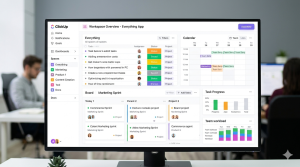
What Is ClickUp?
ClickUp is a cloud-based productivity and project management platform designed to help individuals and teams organize work in one place.
Instead of using multiple tools for:
Task management
Team communication
Document storage
Time tracking
Goal setting
ClickUp combines everything into one platform.
It is used by:
Small businesses
Startups
Marketing agencies
Remote teams
Freelancers
Large enterprises.
The main promise of ClickUp is simple:
“One app to replace them all.”
Key Features of ClickUp
One reason ClickUp stands out from competitors is because it offers a huge number of features.
1. Task Management
At its core, ClickUp helps you create, assign, and track tasks easily.
You can:
Set deadlines
Add priorities
Create subtasks
Add attachments
Leave comments
Track progress
This makes it easy to manage projects from start to finish.

2. Multiple Views
Different people like to manage projects differently.
ClickUp offers multiple workspace views including:
List View
Board View (Kanban)
Calendar View
Gantt Charts
Timeline View
This flexibility makes it suitable for many different working styles.
3. Built-In Time Tracking
Freelancers and agencies especially love this feature.
You can track:
Time spent on tasks
Billable hours
Productivity metrics
Without needing extra time-tracking software.
4. Docs & Notes
ClickUp includes document creation tools inside the platform.
You can:
Write meeting notes
Create SOPs
Build company wikis
Collaborate in real time
This eliminates the need for separate note apps.
5. Automation
Automation saves time by reducing repetitive tasks.
Examples include:
Automatically assigning tasks
Moving tasks when status changes
Sending notifications
Updating deadlines
This is extremely useful for scaling teams.
ClickUp Pricing
ClickUp offers multiple pricing plans.
Free Plan
Best for beginners and small personal projects.
Includes:
Unlimited tasks
Basic collaboration tools
Limited integrations
Unlimited Plan
Great for small teams.
Business Plan
Best for growing businesses.
Enterprise Plan
Designed for large organizations.
The free version is surprisingly generous, making it easy to test before upgrading.
Pros of ClickUp
Extremely Feature-Rich
Few platforms offer as many built-in tools as ClickUp.
Affordable Pricing
Compared to competitors, ClickUp gives a lot of value for the price.
Highly Customizable
You can customize workflows, dashboards, views, and automations.
Great for Team Collaboration
Comments, mentions, shared docs, and notifications keep teams aligned.
Cons of ClickUp
No software is perfect.
Learning Curve
Because ClickUp has so many features, beginners may feel overwhelmed initially.
Can Feel Complex
Some users may prefer simpler tools if they only need basic task management.
Occasional Performance Issues
Large workspaces can sometimes load slower depending on usage.
Who Should Use ClickUp?
ClickUp is ideal for:
Agencies
Managing multiple clients and campaigns.
Remote Teams
Keeping communication and tasks centralized.
Startups
Affordable solution for scaling operations.
Freelancers
Tracking tasks, deadlines, and time.
Who Should Avoid ClickUp?
ClickUp may not be ideal if:
You only need a very simple to-do list
You dislike learning new software
You want minimalistic interfaces
If simplicity is your top priority, lighter tools may suit you better.
ClickUp vs Competitors
ClickUp vs Asana
ClickUp offers more features
Asana is simpler to learn
ClickUp vs Monday
ClickUp is usually more affordable
Monday has a cleaner beginner-friendly interface
ClickUp vs Trello
ClickUp is much more powerful
Trello is easier for very basic projects

Final Verdict: Is ClickUp Worth It?
Overall, yes ClickUp is absolutely worth it for most teams and businesses.
Its biggest strength is that it combines many business tools into one platform, helping reduce costs and improve productivity.
While it may take some time to learn, the value it provides can easily outweigh the learning curve.
My Rating:
9/10
Best For:
Businesses
Teams
Agencies
Productivity-focused professionals
Not Best For:
Users wanting extremely simple software
Should You Try ClickUp?
If you’re tired of juggling multiple apps and want one platform to manage tasks, projects, documents, and collaboration, ClickUp is definitely worth trying.
The best part?
You can start with the free plan and test it yourself before making any commitment.
👉 Related Articles:
If you want to compare ClickUp with other tools, read:
Learn why teams are switching:
7 Reasons Teams Switch to ClickUp.